 WATCH
WATCH
checking the service…
WATCH
Hold the screen, say what you want, let go. The agent answers, takes notes, sets reminders, replies on WhatsApp and draws the route on the map.
DRAG TO ROTATE
All of it by voice. Anything that saves or sends something asks you to confirm on screen first, so a misheard sentence never becomes a real note, reminder or message.
Hold, speak plainly, let go. The answer appears on screen and is read out. Rates, weather and news are fetched from the source right then.
Phone notifications become cards on your wrist. WhatsApp can be answered from the watch: say the reply, check the text, press SEND.
“Note that down”, “remind me at eight”. All of it is stored in the watch, so a reminder still sounds when the network is down.
Record a meeting or a site note. The text runs on screen, and the transcript, the summary and the key points are assembled in the phone app.
“Route to Gedung Sate”, “how far is Cimahi”. The whole route is drawn on the watch, from the map already stored on the phone. Favourite places can be saved.
Updates arrive over the air, with no cable: one tap in the phone app. The battery page shows the daily drain.
Real footage from the watch, unedited: opening the menu, holding the dial to speak, then the agent looking up data and answering on screen.
In this recording
Tap a part to jump to it. Sound is off by default; turn it on with the AUDIO button on the video.
These images are rendered by the watch firmware itself, pixel for pixel. They are not illustrations.
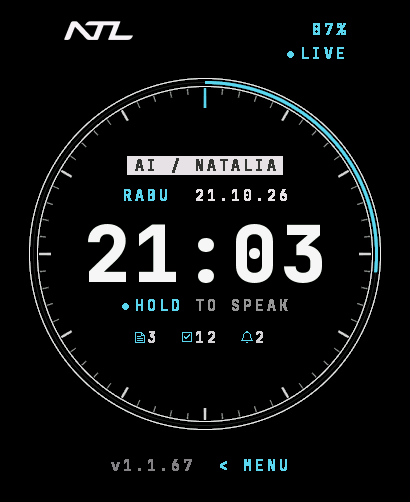
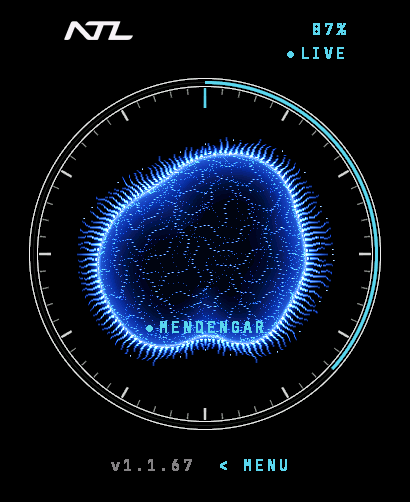
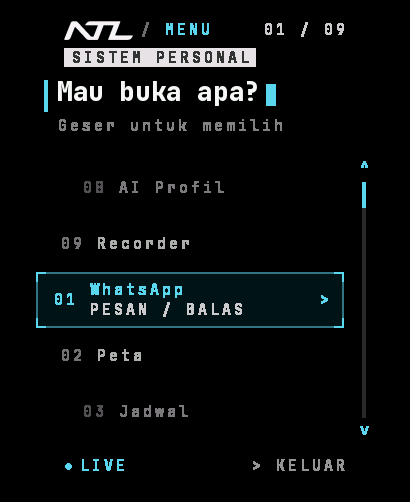
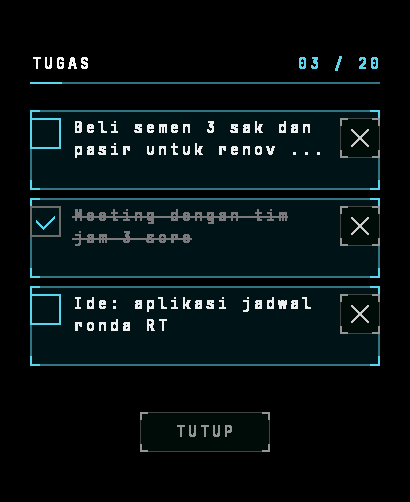
No wake word to memorise and no menus to dig through.
A free Android app that links the watch to your phone over Bluetooth. The internet, the notifications, the position for maps and the recorded documents all come through it.
Hold the lower part of the screen until the listening mark appears, say what you want in ordinary words, then let go.
The answer appears on screen and comes out of the speaker. A route opens straight on the map; a note asks you to confirm first. Want another? Hold again.
Over a cable, with no warning at all. Connect the phone to a computer, turn on Developer options → USB debugging, then run adb install -r ntl-watch-bridge.apk.
Langsung dari ponsel. Saat muncul “Aplikasi berbahaya diblokir”, tekan Detail selengkapnya, lalu Tetap pasang. If that button is missing, turn Play Protect off for a moment: Play Store → profile picture → Play Protect → ikon gigi → turn off Scan apps, install, then turn it back on.
The warning is there because the signer is not yet known to Google, not because anything is wrong with the file. Its fingerprint: SHA-256 1cd8684cffcb86ca661ab48d3497497cbbb6b83c0f2ac1b154bacb9142e0aba8
“Setelan dibatasi” when granting notification access (Android 13 and up): open Settings → Apps → NTL Watch Bridge, press the three-dot menu, choose Allow restricted settings.
Its brain is a current-generation language model running on our own servers. What we built specially, and test and refine every day, is the agent system around it: how it understands what you say, picks its data sources, and checks its answer before reading it out.
Casual phrasing, abbreviations, and names of places or people that are easily misheard are recognised and corrected before the agent starts working.
Weather from BMKG, prayer times from Kemenag, food prices from Bank Indonesia, fuel prices from Pertamina. The figures it reads out are tied to their source.
Answers from the web are checked against their sources first. When the data is not found, it says so plainly instead of making something up.
It chooses between answering, asking back when your meaning is not yet clear, and saying plainly that something is beyond what it can do.
The language model that answers you runs on servers we own, together with the speech recogniser and the voice that answers.
Thousands of test questions run every night, and mistakes from real use become new test questions, so what already works keeps working.
A smartwatch made by NTL Mobile with an AI agent inside it. You hold the screen and say what you want; the agent answers, takes notes, sets reminders, replies on WhatsApp or draws the route.
Yes. The watch links to an Android phone over Bluetooth Low Energy, and the companion app carries the internet, the notifications, the position for maps and the recorded documents. Time, date, reminders and notes keep working when the phone is away.
The position comes from the phone GPS through the companion app, only while the map page is open or when you ask for a route. The watch itself has no GPS receiver.
Yes, for answers, recordings and new map tiles — all of it over your phone data. Maps already stored still draw where the signal is poor.
Usually ten to twenty seconds: quicker for simple things, longer when it has to search first. The screen shows what it is doing while you wait.
Soon. NTL Watch has not been released yet; the price and how to order will be announced on this page once the first batch opens.
Your voice goes to the server to be understood and answered, so it does not stop at the watch. An owner can read the transcript of their own watch from the dashboard, and it is deleted automatically once its retention period ends.
Not yet. This watch answers, takes notes, reminds, shows maps, records and sends WhatsApp messages. Controlling other devices at home is not part of this version.
One product, built in batches. Coming soon — the price and ordering will be announced on this page at release.
Coming soon.
NTL Watch has not been released yet. The price and ordering will be announced on this page.
Your order code
—
Keep this order code. You can check it any time using the box below.
Check order status